SMB user: Connects their chosen bank accounts to QuickBooks Online
Learn how your SMB users can connect their bank accounts to QuickBooks Online
When the SMBSMB The primary customer segment that Codat helps businesses serve, typically companies with annual revenues under $500 million. user visits the linkUrl, they're directed to the QuickBooks Online Bank FeedsBank Feeds A Codat product that enables automatic synchronization of bank transaction data into a company's accounting software. LinkLink The authorization flow that allows end users to connect their accounting, banking, or commerce platforms to your application via Codat. UI. This site allows the SMBSMB The primary customer segment that Codat helps businesses serve, typically companies with annual revenues under $500 million. user to generate a one-time username and password for connecting one or more bank accounts to QuickBooks Online (QBO).
For security reasons, the linkUrl will expire one hour after it was generated.
Summary of SMBSMB The primary customer segment that Codat helps businesses serve, typically companies with annual revenues under $500 million. user connectionConnection A link between a Codat company and a data source (like an accounting platform). Each connection represents authorized access to pull or push data from that platform. flow
To connect their bank accounts to QBO, the SMBSMB The primary customer segment that Codat helps businesses serve, typically companies with annual revenues under $500 million. user performs the following steps in the QBO Bank FeedsBank Feeds A Codat product that enables automatic synchronization of bank transaction data into a company's accounting software. LinkLink The authorization flow that allows end users to connect their accounting, banking, or commerce platforms to your application via Codat. UI and in their QBO account.
Generate one-time credentials
-
From within your application, the SMBSMB The primary customer segment that Codat helps businesses serve, typically companies with annual revenues under $500 million. user opens the
linkUrlin their browser.The QBO Bank FeedsBank Feeds A Codat product that enables automatic synchronization of bank transaction data into a company's accounting software. LinkLink The authorization flow that allows end users to connect their accounting, banking, or commerce platforms to your application via Codat. UI is loaded.
-
On the Connect to QuickBooks Online Bank FeedsBank Feeds A Codat product that enables automatic synchronization of bank transaction data into a company's accounting software. page, they review the requested permissions, then click Next.
-
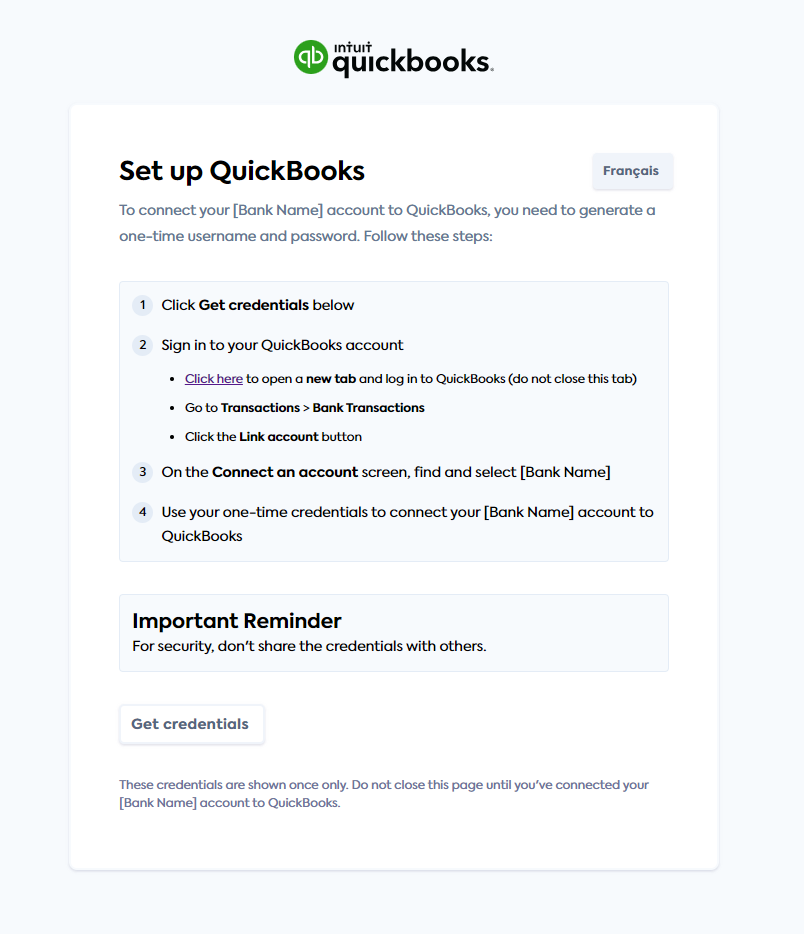
On the Set up QuickBooks page, they click Get credentials to generate their unique one-time username and password for connecting an account to QBO (see step six in the next procedure). The Revoke credentials button appears immediately after their credentials are generated — see Revoke credentials to learn more.
-
They follow the instructions displayed in the UI. These are summarized in the next procedure.
Enter one-time credentials in QuickBooks
-
The SMBSMB The primary customer segment that Codat helps businesses serve, typically companies with annual revenues under $500 million. user signs in to QBO and goes to Transactions > Bank Transactions.
-
They click the LinkLink The authorization flow that allows end users to connect their accounting, banking, or commerce platforms to your application via Codat. account button.
-
On the Connect an account screen, they find and select your organization from the list of institutions that provide bank feedsBank Feeds A Codat product that enables automatic synchronization of bank transaction data into a company's accounting software..
-
They agree to the terms and conditions.
-
They enter their one-time username and password into QuickBooks and complete the authentication prompt.
-
They select one or more source bank accounts to connect to QBO.
-
In the dropdown that appears, they select the account type — the chart of accounts — that they want to view bank feedsBank Feeds A Codat product that enables automatic synchronization of bank transaction data into a company's accounting software. for.
-
They select a start date for the bank feed.
Limitation on writing historic transactionsIf the SMBSMB The primary customer segment that Codat helps businesses serve, typically companies with annual revenues under $500 million. user selects a bank feed start date older than seven days, it will be ignored. The integration only supports writing historic transactions up to seven days old.
-
Finally, they click Connect.
Your SMBSMB The primary customer segment that Codat helps businesses serve, typically companies with annual revenues under $500 million. user has now successfully connected their chosen bank accounts to QBO. The status of the data connectionConnection A link between a Codat company and a data source (like an accounting platform). Each connection represents authorized access to pull or push data from that platform. changes to Linked; you can now write bank transactions to QBO for the SMBSMB The primary customer segment that Codat helps businesses serve, typically companies with annual revenues under $500 million. user.
Revoke credentials
The Revoke credentials button allows the SMBSMB The primary customer segment that Codat helps businesses serve, typically companies with annual revenues under $500 million. user to revoke their previously generated credentials. This option invalidates all their existing credentials; you can no longer write bank transactions to QBO from any bank accounts that used those credentials.